
How to Create Auction Listings Faster: A Step-by-Step Guide
Learn how to create auction listings faster by streamlining product identification, pricing, descriptions, photos, and repetitive listing tasks.

Creating auction listings often takes more time than expected.
For every auction lot, you may need to take photos, identify the product, research product details, write a description, check the MSRP, determine a starting bid, organize the images, and enter everything into your auction system.
Processing a few items this way may be manageable.
But when an auction house, reseller, liquidation business, or warehouse team needs to process dozens—or even hundreds—of items a day, the workload can add up quickly.
Even saving a few minutes per item can make a significant difference across hundreds of lots.
So, how can you make the auction listing process faster and more efficient?
1. Build a Consistent Workflow Before You Start Listing
A faster auction listing process begins with creating a consistent workflow.
Instead of handling each item differently, establish a repeatable sequence for every lot.
For example:
Prepare Item → Assign Lot Number → Take Photos → Identify Product → Create Product Information → Research Pricing → Create Listing
When employees follow different processes, photos can get mixed up, information may be missed, and additional time is often spent correcting mistakes later.
A standardized workflow becomes especially important when multiple employees are processing inventory at the same time.
2. Keep Product Photos Organized by Lot Number
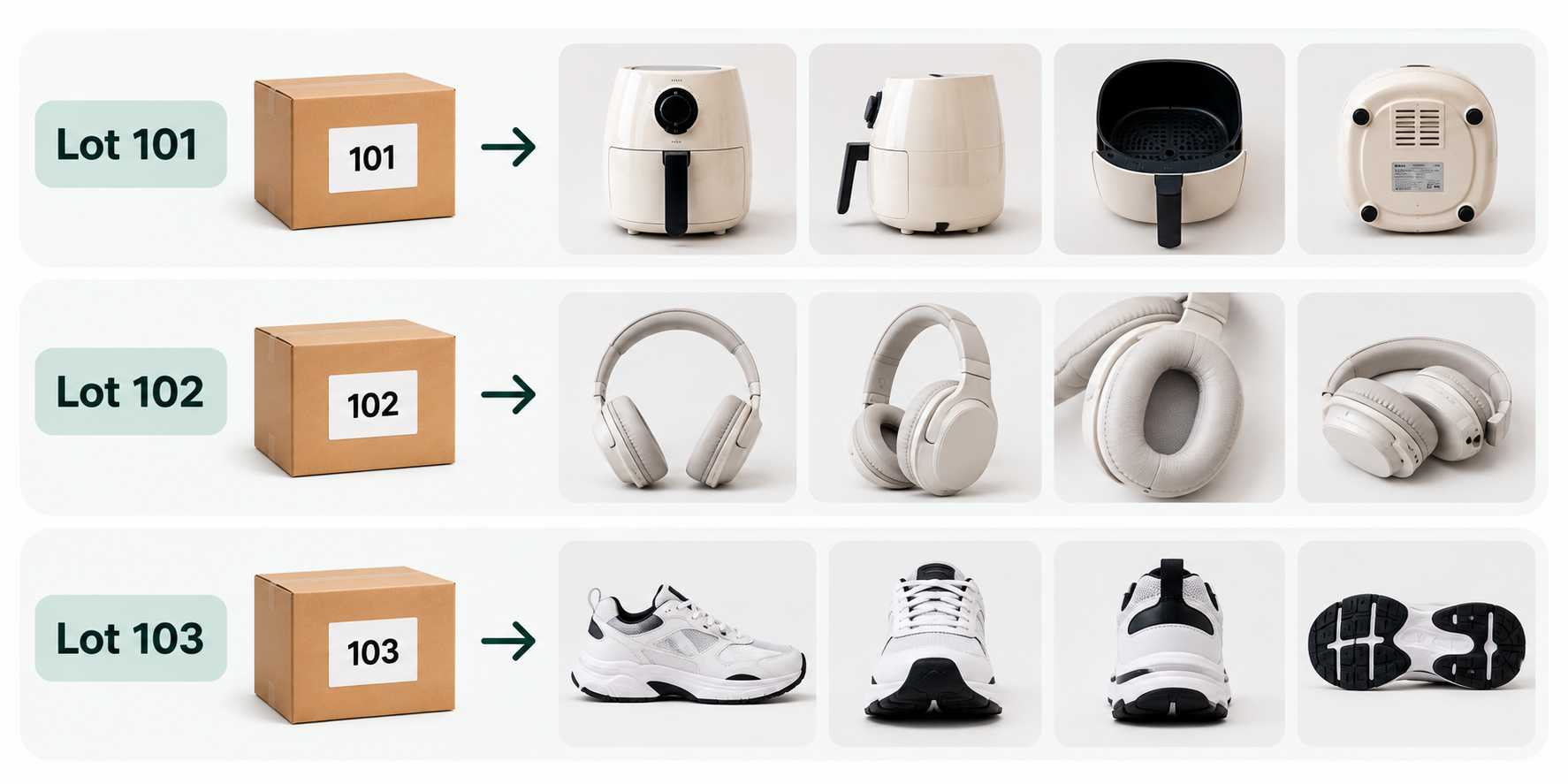
Photos are one of the most important parts of an online auction listing.
They help buyers evaluate the item, but they also help your team keep inventory organized during the listing process.
From the moment photos are taken, it should be clear which images belong to which auction lot.
For example:
Lot 101 → Take all photos
Lot 102 → Take all photos
Lot 103 → Take all photos
Keeping this sequence consistent can reduce the amount of time spent sorting and matching photos later.
It can also help to standardize the number of photos and the angles used for similar types of products.
3. Identify the Product Accurately
Liquidation merchandise, customer returns, overstock, and warehouse inventory do not always come with clear product information.
In these situations, several details can help identify an item:
- UPC or barcode
- Model number
- Brand name
- Product label
- Manufacturer information
- Image search
Accurate product identification matters.
Two products may look almost identical while having different model numbers, sizes, capacities, features, or retail values.
Instead of identifying an item based only on appearance, compare as much available product information as possible.
4. Collect the Information You Need in One Place
Once the product has been identified, organize the information needed for the auction listing.
The exact fields will vary depending on your business and auction platform, but common information may include:
Product Title
Brand
Model
Category
Key Features and Specifications
Item Condition
MSRP or Reference Price
Starting Bid
Using the same structure for every lot makes it easier to review inventory and transfer information into spreadsheets or auction platforms later.
It also creates more consistent listings for buyers.
5. Auction Lot Descriptions Don’t Need to Be Long
A good auction lot description does not have to be lengthy.
The goal is to help potential buyers quickly understand what the item is and what information is known about it.
Focus on details that can affect the buyer’s decision, such as:
- Brand and model
- Key specifications
- Size or capacity
- Included components
- Visible condition
- Other relevant product details
Avoid making assumptions about features or condition that have not been verified.
This is particularly important when dealing with returns and liquidation inventory, where the condition of individual items can vary.
A clear, accurate description is usually more useful than a long description filled with unnecessary information.
6. Understand the Difference Between MSRP and Current Market Price
One piece of information commonly researched when creating auction listings is the Manufacturer’s Suggested Retail Price (MSRP).
However, MSRP and the price an item currently sells for are not always the same.
A product may have originally had an MSRP of $500 but currently sell for significantly less because of discounts, newer models, or changes in market demand.
MSRP can still be useful as a reference point, but current market pricing may also be worth reviewing.
The same principle applies when determining a starting bid.
Rather than relying only on MSRP, consider factors such as:
- Item condition
- Current market price
- Inventory volume
- Demand
- Your auction strategy
7. Reduce Repetitive Work
One of the biggest reasons auction listing takes so much time is repetition.
For every item, a team member may have to:
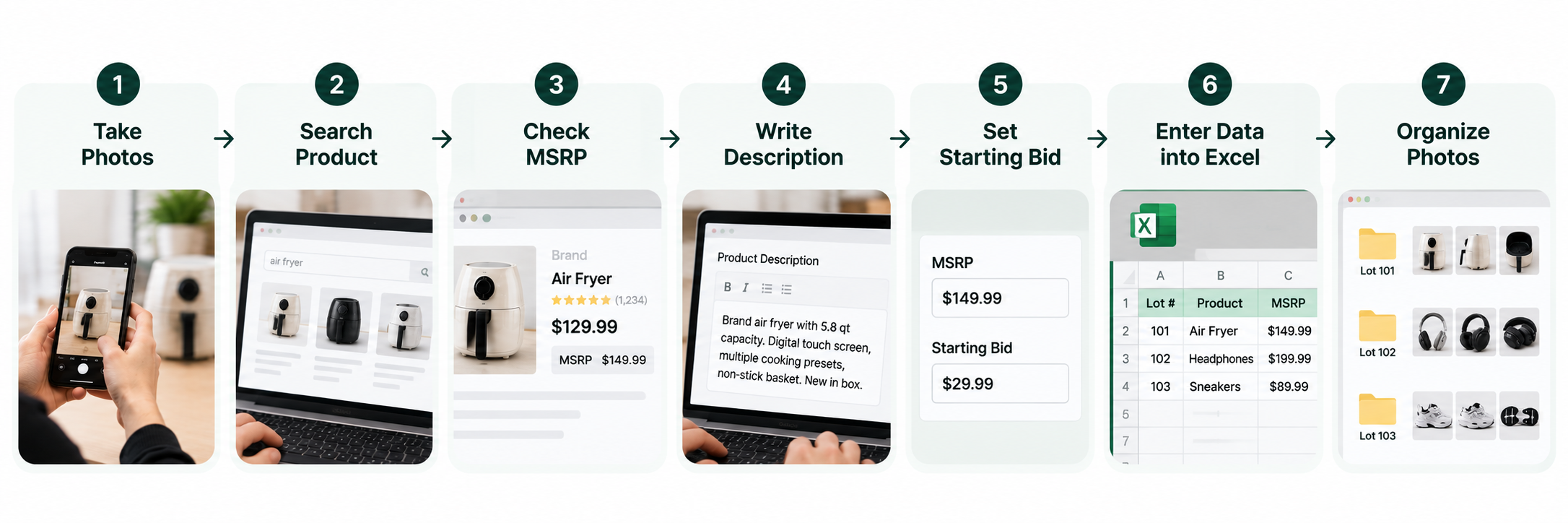
When this process is repeated across hundreds of products, even small tasks can consume hours.
That means improving auction listing speed isn't simply about typing descriptions faster.
The bigger opportunity is reducing the number of repetitive steps required to turn physical inventory into an auction-ready lot.
8. Use AI to Automate Parts of the Auction Listing Process
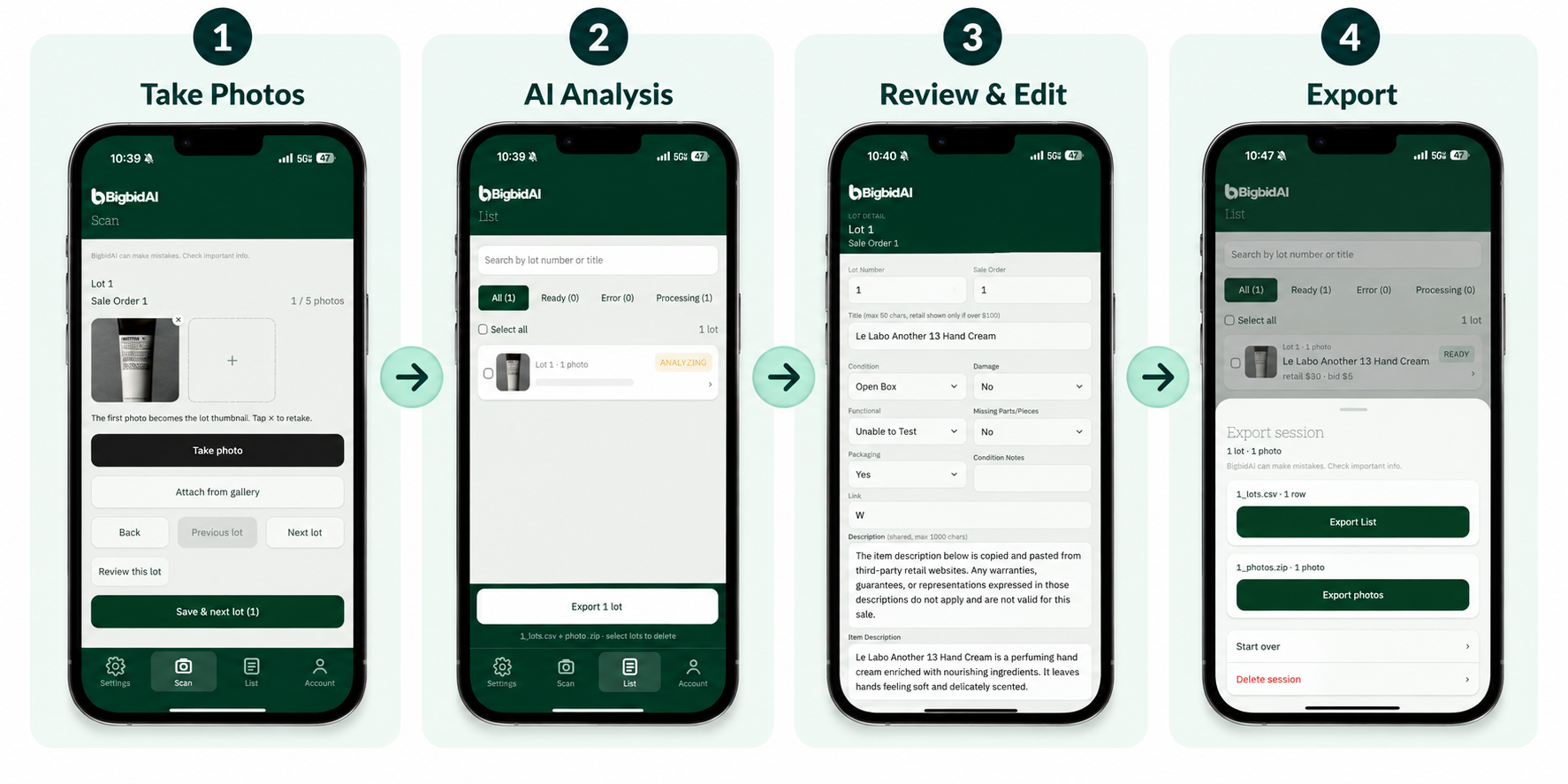
AI and image recognition can now help automate parts of the auction listing workflow.
For example, AI can assist with identifying products from photos, generating product titles and descriptions, and organizing pricing information.
This can be especially useful for auction houses and liquidation businesses processing large volumes of inventory.
However, AI-generated information should still be reviewed before a listing is published.
The goal of automation isn't necessarily to eliminate human judgment.
It's to reduce repetitive searching, writing, and data-entry tasks so employees can spend more time reviewing inventory and preparing auctions.
From Product Photos to Auction Lots with bigbidAI
bigbidAI is an AI-powered tool designed for auction houses, resellers, liquidation businesses, and other teams that process large volumes of inventory.
Instead of manually researching every product from scratch, bigbidAI helps analyze product photos and assists with generating information such as:
Product Identification
Product Titles
Lot Descriptions
MSRP Reference Information
Recommended Starting Bids
The results can be reviewed and edited before they are used.
For teams processing multiple products, the goal is to simplify a workflow that traditionally looks like this:
Take Photos → Search for Product → Research Pricing → Write Description → Organize Lot → Enter Data
into a more streamlined process:
Take Photos → AI Analysis → Review & Edit → Export
Automation doesn't replace the final review.
It reduces the repetitive work required before that review.
Final Thoughts
Creating auction listings faster isn't simply about writing descriptions more quickly.
The entire workflow matters.
Photography → Product Identification → Research → Pricing → Lot Organization → Data Entry
As inventory volume increases, saving even a small amount of time on each item can translate into significant time savings across an entire auction.
If your team is still searching for products individually, writing every description manually, researching prices one item at a time, and entering the same information into spreadsheets, start by identifying the most repetitive parts of your workflow.
Those repetitive steps are often the best place to begin automating.
Want to turn product photos into auction-ready lots faster?
Try bigbidAI and see how AI-assisted product identification, listing creation, pricing information, and export can simplify your auction listing workflow.